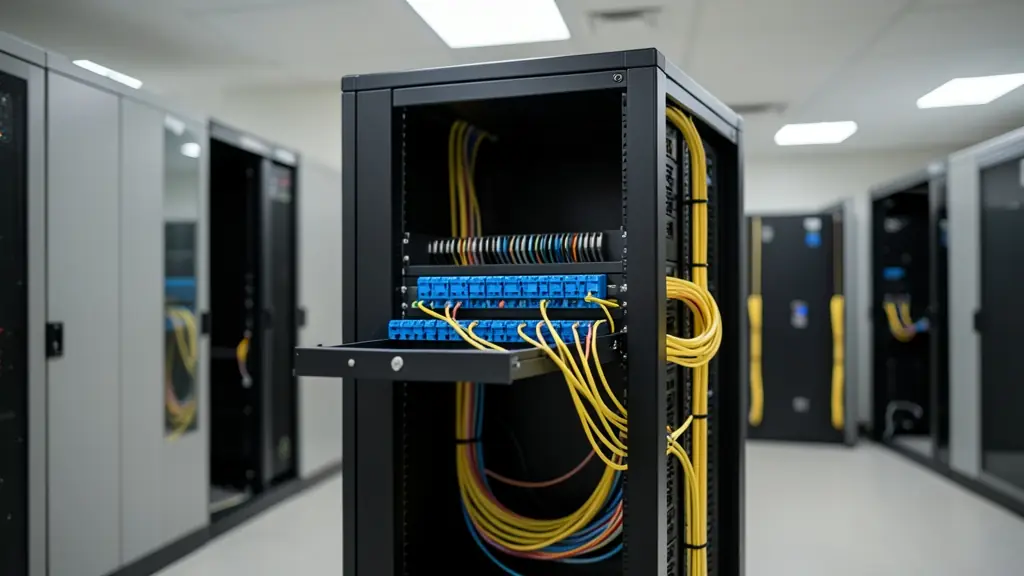
A fibre patch panel is where an incoming cable stops being a cable and becomes a row of ports you can patch. Inside, each fibre is spliced to a pigtail in a splice tray or ends on a pre-terminated connector; on the front, adapters take the patch cords to your switches. Rack-mount panels in 1U and 2U sizes cover most offices, factories and server rooms, wall boxes suit small sites, and ODFs handle the high counts in exchanges and data centres. Here is how to choose the size, the adapters and the layout, and what a supplier needs from you to quote.
Rack panels, wall boxes and ODFs
Most panels are made for a 19-inch rack. A 1U panel (one rack unit, 44.45 mm high) usually takes 12, 24 or 48 ports; a 2U panel takes more, up to 96 in high-density versions. Many have a sliding drawer or a hinged front so you can reach the splice trays without unplugging anything. Where there is no rack, a wall-mount box holds a few trays and adapters in a plant room, a gatehouse or a pump house. In exchanges, data centres and large campuses an ODF (optical distribution frame) stands as its own frame and terminates hundreds of fibres in one place, with room for cross-connects.
Adapters, connectors and splice trays
The front of a panel is a set of adapter plates (adapters are also called couplers): LC duplex for most new work, SC for many FTTH and older panels, sometimes ST or FC on old multimode or test racks, and MPO cassettes in data centres. Match the adapter to the patch cords and to the end face: blue for single-mode UPC, green for APC, beige or aqua for multimode. Never put an APC cord into a UPC adapter. Inside, splice trays often hold 12 or 24 splices each, so a 48 fibre panel needs two to four trays. See fibre optic connectors and patch cords and pigtails for the parts that plug in.
Pre-loaded or empty panels
A pre-loaded panel arrives with adapters, pigtails and trays fitted, ready for the splicing team to fuse the incoming fibres. An empty panel lets you choose each part, which helps when a panel mixes single-mode and multimode, or when you want spare ports for a second cable later. In data centres, pre-terminated MPO trunks plug into cassettes with no splicing on site at all. Plan for growth: a half-used 24 port panel today beats squeezing a second panel into a full rack next year.
Cable management and labelling
A good panel install is tidy behind and in front. The incoming cable is clamped and its strength member fixed at the entry, the loose tubes are routed to the trays without tight bends, and the slack is stored in the panel or the rack, not crushed behind the door. Patch cords run through horizontal and vertical cable managers to the switch. Label every port with the cable, the fibre and the far end, use the same scheme on the panels at both ends, and file it with the report from fibre testing and the as-built drawings.
What to put in your request
- Fibre count and type of each incoming cable
- Rack size and the free rack units
- Adapter type: LC, SC or MPO, UPC or APC
- Pre-loaded or empty, and whether splicing is needed
- Labelling and the test reports you want
Fibre Patch Panels and ODFs for estates, offices, factories, mines, farms and more
- Houses and home offices: a small wall box in a garage or study where a link from the gate or a cottage ends
- Estates, complexes and body corporates: panels in the gatehouse and clubhouse racks ending the estate's camera and access fibre
- Offices, business parks and shops: 1U and 2U panels in each floor's comms cabinet and in the main server room
- Factories, warehouses and plants: panels in control rooms and wall boxes in warehouses linking the plant network
- Mines, quarries and heavy industry: rack panels and rugged wall boxes in control rooms at the ends of long armoured links
- Farms, wine estates and lodges: a wall box in the farm office, cellar or pump house where the fibre from the yard ends
- Schools, campuses, hospitals and municipalities: panels in school, hospital and municipal server rooms joining buildings on one campus
- Data centres and server rooms: high-density panels, MPO cassettes and ODFs for cross-connects between racks and suites
- Network operators, ISPs and contractors: ODFs and high-count panels in exchanges, tower sites and cabinets for backbone fibre
Frequently asked questions
How many ports does my fibre patch panel need?
Should I splice pigtails or use pre-terminated cable?
Can one panel take single-mode and multimode?
Do you sell or install fibre patch panels yourselves?
Fibre Patch Panels and ODFs by province and city
- Johannesburg
- Pretoria
- Centurion
- Midrand
- Sandton
- Randburg
- Roodepoort
- Krugersdorp
- Randfontein
- Germiston
- Boksburg
- Benoni
- Kempton Park
- Alberton
- Vanderbijlpark
- Vereeniging
- Durban
- Pinetown
- Pietermaritzburg
- Richards Bay
- Newcastle
- Ladysmith
- Gqeberha (Port Elizabeth)
- East London
- Kariega (Uitenhage)
- Mthatha
- Cape Town
- Bellville
- Paarl
- Stellenbosch
- George
- Worcester
- eMalahleni (Witbank)
- Middelburg
- Secunda
- Mbombela (Nelspruit)
- Rustenburg
- Brits
- Klerksdorp
- Potchefstroom
- Mahikeng
- Polokwane
- Tzaneen
- Kimberley
- Upington
- Bloemfontein
- Welkom
- Sasolburg